
June 2025 [Release v0.515.0 – v0.516.0]

Updated

AI-powered Import PDF as Work Instruction

You can now convert PDF documents directly into Azumuta work instructions using Azumuta Intelligence. This makes it easier to reuse existing documentation and speed up the setup of digital instructions.

Convert a PDF by clicking this button when you’re adding work instructions steps to a new work instruction.

A user interface button labeled “Import PDF document with AI,” featuring a PDF file icon on the left and a purple icon with sparkles on the right, indicating AI functionality.

Learn more about Azumuta’s AI features.

Role-Based Access Controls

User permissions are now managed through Azumuta groups. Individual user rights are no longer editable (except for email notifications and office access), making access management more consistent and easier to maintain across your organization.
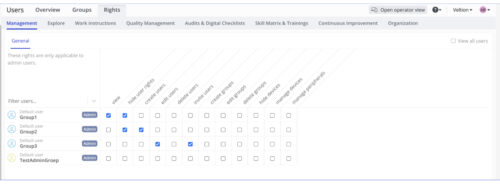
Admin panel showing user rights management in a software interface. The screen lists four user groups with various permissions such as view, create users, edit users, invite users, and manage devices. Permissions are toggled via checkboxes, and each group has different combinations of rights assigned. Tabs for Management, Explore, Work Instructions, and other modules are visible at the top.

Note: This feature is disabled by default. To activate it, please contact us at support@azumuta.com.

Custom Video Thumbnails

When adding a video fragment, you can now select the exact frame you want to use as its thumbnail. This makes it easier to create clear, recognizable visual previews for each instruction step.
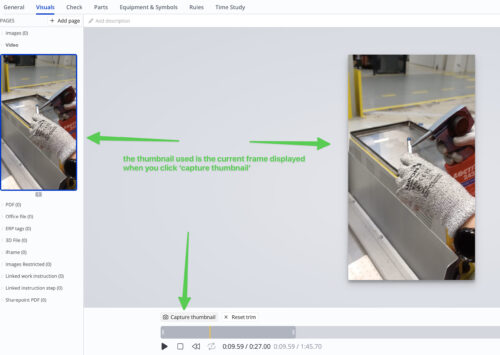
Screenshot of a video editing interface in a digital work instruction tool. A frame from a video showing a gloved hand using a spray can is displayed. Green arrows and text explain that the thumbnail shown in the sidebar is based on the current video frame selected when clicking the “Capture thumbnail” button. The interface includes tabs like General, Visuals, Check, Parts, and more.

Learn more about adding videos to instructions steps in Azumuta.

Workstation Monitoring on Dashboards

You can now add a new workstation widget to Azumuta Dashboards to monitor the live status and activities of individual workstations. This provides a more detailed, real-time view of what’s happening across your shop floor.
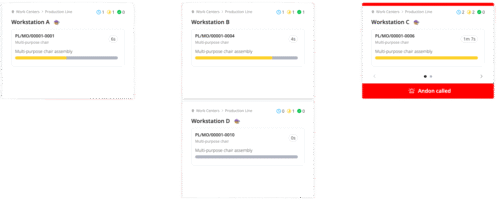
Dashboard view of a digital production line interface displaying four workstations (A, B, C, and D) assembling multi-purpose chairs. Each workstation card shows a product ID, task progress bar, and elapsed time. Workstation C is highlighted with a red banner and “Andon called” alert, indicating a flagged issue requiring attention. Progress bars are partially filled, reflecting task status in real time.

Join The Digital Shop Floor Revolution!