
Competency-Gated Production Orders
A work instruction can require a minimum training level before an operator is allowed to start a product order on it. This enforces, at the moment work starts, the competency you already track on the Skill Matrix. It builds on the mandatory training indicator by acting on the requirement instead of only flagging it.
Set the requirement
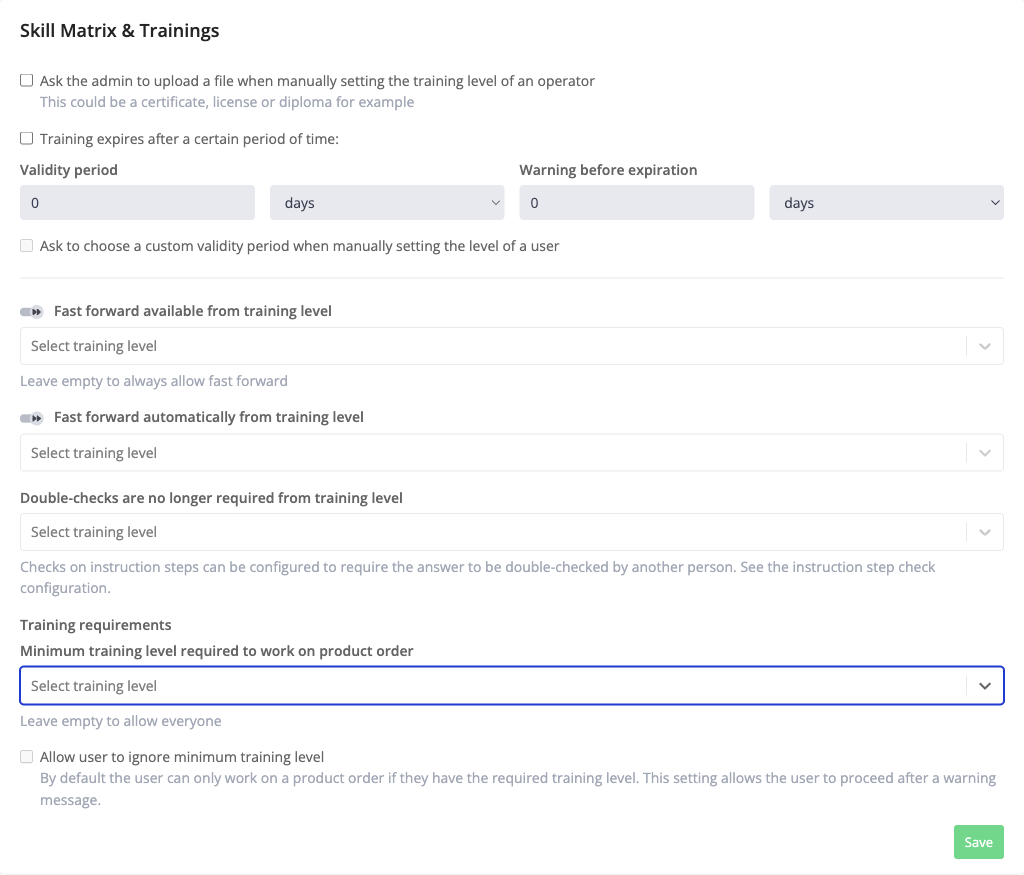
- Open the work instruction and go to the Skill Matrix & Trainings tab.
- In the Training requirements section, set Minimum training level required to work on product order, chosen from your Skill Matrix training levels. Leave it empty to allow everyone.
- By default an operator below that level is blocked from starting. To let them proceed after a warning instead, tick Allow user to ignore minimum training level. This option becomes available once a minimum level is set.
- Save.
What the Operator Sees
- By default, an operator below the required level who tries to start the order gets an Unable to start product order message showing the required level and their own level, and cannot continue.
- When Allow user to ignore minimum training level is on, the operator is warned that proceeding will be added to the report, and can choose Continue or Go back.
Either way, the operator's training level at the start is captured on the recording and shown in the recording report, so there is a record of who started the order and whether they met the requirement.
On the Skill Matrix
Cells that fall short of a work instruction's entry requirement are flagged with a red dot, so you can spot competency gaps before they stop an order on the floor.
Learn more about the Skill Matrix and executing a product order in Azumuta.