
Training Validity Period (Expiry)
What Is a Training Validity Period?
Some competencies should not be considered valid forever. To keep your skill matrix aligned with certification standards and internal compliance rules, you can attach an optional validity period to a training. Once an operator’s competency reaches the end of that period, Azumuta automatically flags it on the skill matrix so managers and operators know that re-training is due.
You can also configure a warning window that highlights the competency before it expires, giving you time to plan the next training session.
Add a validity period to a training
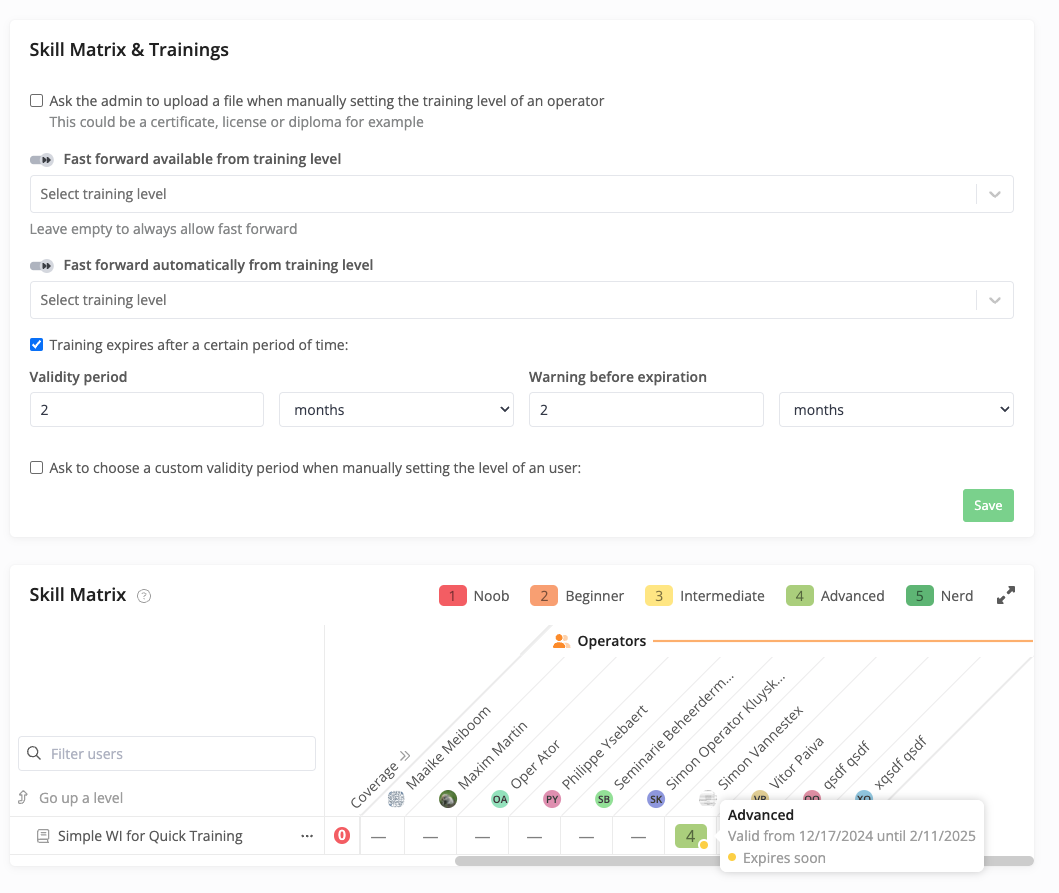
The validity period is configured on the training’s Skill Matrix & Trainings settings, the same place where you control fast-forward behavior and other matrix options.
- Open the work instruction used for the training.
- Go to the Skill Matrix & Trainings section of its settings.
- Tick the checkbox Training expires after a certain period of time.
- Fill in the Validity period — a duration (e.g. 2 months, 12 months, 1 year) that defines how long a competency stays valid after it is granted.
- Fill in the Warning before expiration — a duration that controls how far in advance the matrix should warn you that the competency is approaching expiry.
- Optionally tick Ask to choose a custom validity period when manually setting the level of an user if you want admins to be prompted to override the default duration per user when they validate or score a competency.
- Click Save.
What Happens When a Competency Expires
When an operator is granted this competency, Azumuta calculates the validity window from the moment the level is set and stores both the start and end date on the matrix entry. From there:
- While the competency is valid and outside the warning window, it shows up as usual on the skill matrix.
- When it enters the warning window (e.g. the last two months before expiry), Azumuta marks it with an orange dot and the tooltip shows Expires soon together with the valid-from and valid-until dates.
- Once the validity period ends, the competency is treated as expired — marked with a red dot — indicating that the operator needs to be re-trained and re-validated.
Visibility in the Skill Matrix
Hovering a competency cell in the matrix reveals the validity details: the achieved level, the period during which it is valid (“Valid from … until …”), and a status hint (“Expires soon” or “Expired”). This makes it straightforward for managers to spot which operators need a refresher and to schedule the next training accordingly.
Important Notes
- The validity period is configured per training/work instruction, not as a global account-wide setting.
- If you enable the per-user override, the validity period set when validating an operator’s level only applies to that user’s entry; other operators keep using the default validity period defined on the work instruction.
- Each new validation (re-training) starts a fresh validity window for the operator, so you don’t need to clear the previous entry manually.